


How to Use the Valorant Stat Tracker to Improve your Performance and Track Your Stats

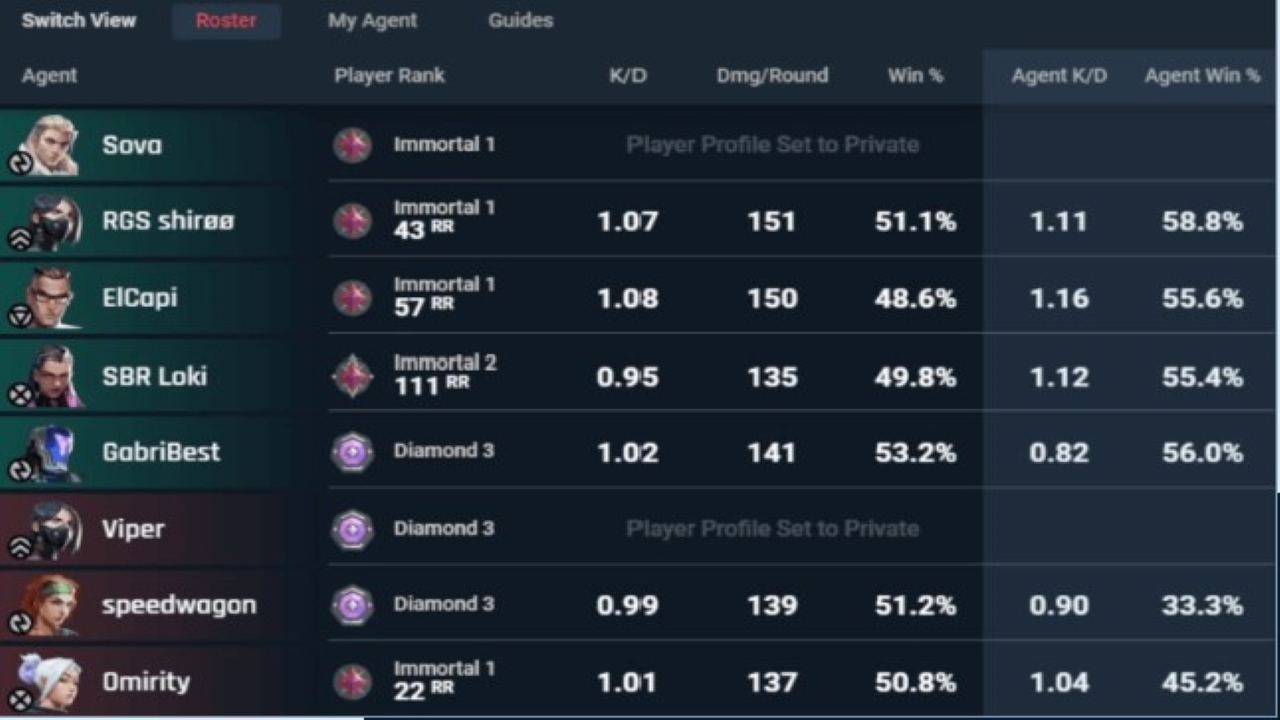
Valorant is a game in which consistency matters the most. Even professional players struggle to maintain their consistency in the long term. That is why, reviewing your gameplay and tracking your results for each match matter a lot. That is why, we need a software/website which is easy to use and lets you review your gameplay and progress. In this case, look no further than the Tracker Network. Everyone from professional players to content creators uses this website to track their results and progress. Today we will look at how you can use this website to improve your own game.
Here’s How You Can Use the Valorant Tracker Network to Improve Your Game
First, you will need to make an account and import all your Valorant information into the website. Do not worry, there are simple steps to that. Let us take a look at them.
- Go to this link, it opens the Valorant Tracker website.
- There should be a Sign In button on the top right corner, click there and make an account.
- After you have made a profile, click on your Profile and go to Linked Accounts. Go to the Riot Games account option and connect your Riot Account to this website.
- This will import all of your stats from matches, KD and W/L ratios, and more statistics to the website.
- You can even use the search bar on the main Valorant screen to find data about a specific player, agent, and more!
- They have recently added Premier Stats and other tracking systems related to the Premier System that are worth checking out if you are playing the Premier.
How to Improve Your Performance
Now to improve your performance using this website, we recommend trying out various things. First, you need to recklessly track your stats and progress after each match. Check your headshot percentage, ACS, and other important stats to see if you are improving a little day by day.
Play smart, out-think your opponent, anyone can aim well with a little bit of practice but good trigger discipline, game sense, and smart plays only come through awareness and knowing the game. By tracking your progress game by game and improving on the little aspects, you can easily improve in Valorant using this website.
That was all you need to know about the Tracker app! Check it out for yourself and see how you have been performing in your last games! For more Valorant content, click here!
About the author


-

ch33n1 L4NC3L077 •
CSGO Dust 2 Callouts to communicate better with your Teammates.
-

Yuvansh Ruia •
VALORANT tease new agent with leaked Battlepass and in game clues
-

Tanmaiy Reddy •
Valorant pro teams which failed: TSM ,Faze ,T1 and more who did not perform in the VCT 2022 Stage 1
-
Adnan Juzar Kachwala •
Valorant Pacific Match-Up: T1 vs DetonatioN FocusMe; Predictions, Head to Head, Where to Watch and More!
-
Adnan Juzar Kachwala •
Valorant News: Split Returns to Competitive Queue; However, there’s a Catch
-

Yuvansh Ruia •
Team Liquid VALORANT Roster trial ex-CSGO player, AREA to replace Sliggy as head coach