


How to pre-install Genshin Impact 3.4 update before release


Genshin Impact 3.4 update release is just around the corner and will take up a substantial amount of space in your preferred devices. The update will be sized at 7 GB for PC and 1.5 GB for mobile. Since the download time for the same will be high, travelers can pre-install Genshin Impact 3.4 update.
Here is a guide on how to pre-install Genshin Impact 3.4 update for release.
Also read: Death Stranding giveaway crashes Epic Games Store and Fortnite for PC players
How to pre-install Genshin Impact 3.4 update for PC and mobile
◆ Yaoyao
◆ Burgeoning Grace
◆ Disciple of Streetward Rambler
◆ Dendro
◆ Osmanthus#GenshinImpact #Yaoyao pic.twitter.com/XV5INsqOqs— Genshin Impact (@GenshinImpact) December 9, 2022
The pre-installation option will be available a few days before the official update is out. Players just have to follow simple steps to download it for PC and mobile.
Keep in mind that players will not be able to access the game during the pre-installation process.
For PC

- To get the pre-load, travelers have to open the Genshin Impact launcher. Players will then be able to see the option to update it.
- Players will then be able to see the pre-install patch 3.4 on the left side of the Launch button.
- To move forward, players will have to select the launch option, and the data will be start getting downloaded.
For mobile

To download the pre-install, players have to look at one of the two options.
- Players can get the pre-load from the login screen “Pre-Install Resource Package” will be in the left corner. Players can click on the pre-installation option.
- Once the installation is done, you will get a pop-up that players have to confirm.
The second option is to use the settings option:
- Players have to go to the settings
- After that, scroll down to other and click on the Pre-Install Resource Package
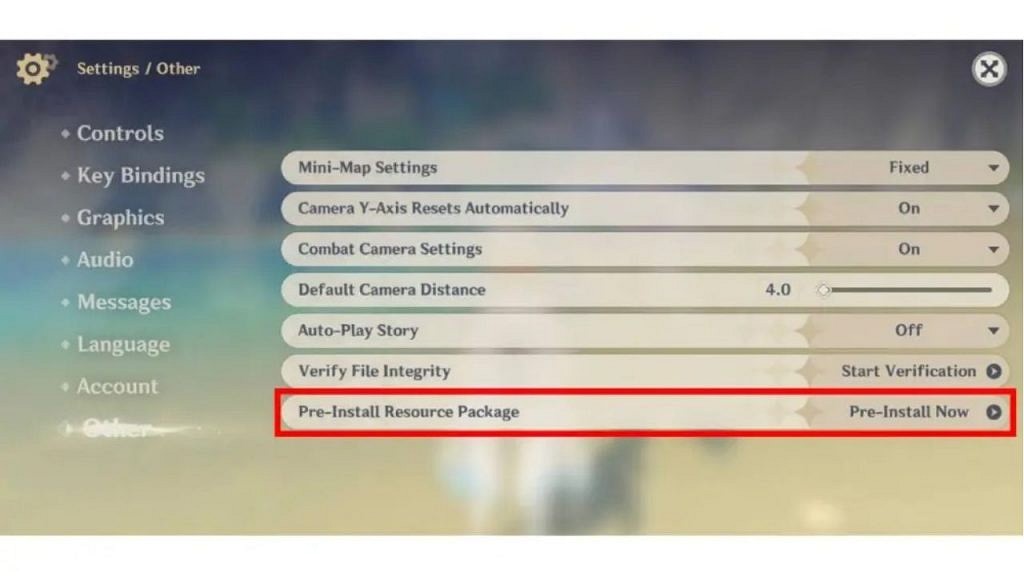
If you are pre-installing it on a mobile, you will not be able to play the game. But if you’re on your PC, then you can easily enjoy the game while the pre-installation is getting downloaded.
Also Read: Call of Duty: Top 5 Games of All Time; Did your favorite make the List?
About the author


-

Ripan Majumdar •
Ryujinx Appears to Be Next on the Chopping Block as Nintendo Tightens Its Grip
-

Ripan Majumdar •
Bethesda Believed They Were Too Small to Compete in the RPG Space When Releasing The Elder Scrolls: Arena
-

Ripan Majumdar •
EA FC 24 Claude Makelele Ultimate Birthday Icon SBC: Steps to Acquire This Card in Ultimate Team
-

Ripan Majumdar •
EA FC 24 Alejandro Grimaldo Ultimate Birthday SBC: Steps to Acquire This New Special Card
-

Ripan Majumdar •
Developers Applaud GDC 2024 for Giving Them a Platform to “Say What They Need to Say”
-

Ripan Majumdar •
EA FC 24 Juan Cuadrado Ultimate Birthday SBC: Steps to Acquire This Card in Ultimate Team