


What is Angle Snapping in Valorant : How Can it Help Players hit More Headshots?

There are multitudes of settings players can change or adjust in Valorant so that they get the optimum gameplay. Some of them are FPS-related like the graphical settings and resolution. However, some software options from certain industry standard mice can really help hit their headshots better and faster, believe it or not. Certain gaming mice now have the option to Enable Angle Snapping. Today we will discuss what it is, if it’s bannable, how players can benefit from it, and which mice have this option.
Angle Snapping: The Newest Advantage Players can Get from Their Mice in Valorant!
What is Angle Snapping? How Do Players Benefit from it?
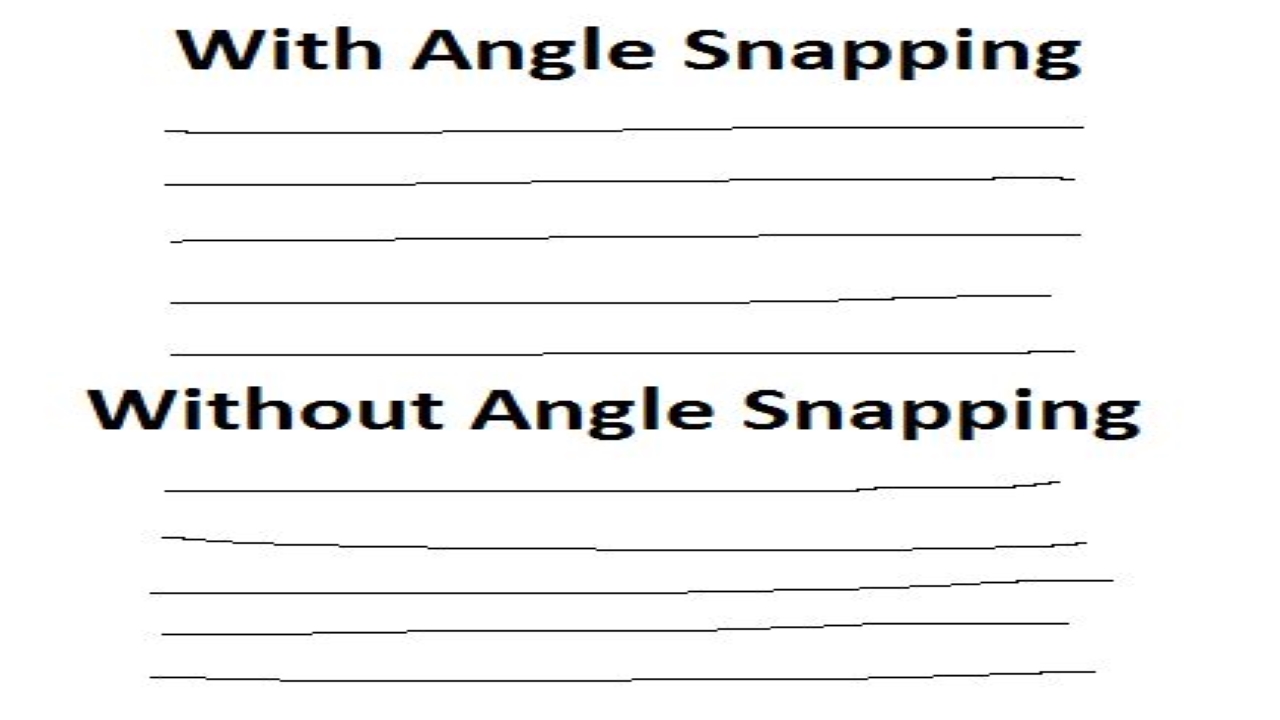
The gaming industry is constantly evolving. The products keep getting better and the software that comes with them is becoming smarter. Angle Snapping is one of the options provided for certain gaming mice which can improve your initial snap onto enemies in the game. This feature lets gamers move their mouse horizontally in a straight line. If there are minor jerks, this features ensures the crosshair placement is stable to hit headshots.
Now you have a chance to aim like El Diablo ‘Yay’, with these designs of mice. This feature works by predicting and correcting hand movements. In addition, it ensures that minor vertical diversions do not affect the headshot angle so you don’t miss the head even by the smallest of margins. It is a really useful feature that can help newer players during game sessions.
Is it Bannable?
No, this feature is not bannable since it does not give any kind of aim assist. It helps improve aim. It just helps reduce unnecessary movement during target snapping. Plus if players disable this function, they can test it out and see how they do without this feature. This is essential in ensuring that players learn the game faster, it is not something that can get them banned from the game.
What Industry Standard Mice have this Feature?
There are multiple gaming brands that have inculcated this feature in their products. Some of the software supporting them are:
- Republic of Gamers
- Lioncast
- Corsair
To use the feature, go to the respective official websites of each of their brands, download the software, launch it, and enable the angle snapping feature from the Mouse/Device settings. We only recommend using company-issued products and not other hardware since it might conflict and cause problems with other software. Check and read the features before using them. For more Valorant and Esports-related news, stay tuned at The SportsRush!
About the author


-
Tanmaiy Reddy •
Arcane Collector Set: Riot gears up for Arcane by announcing The Free RiotX Arcane Pass
-

The SportsRush Desk •
“A statement made”: Sentinels hilariously troll 100Thieves after 2-0 clean sweep at Valorant Champions Tour NA
-

Gautham Balaji •
Fall Guys Cheaters Patch : Latest Fall Guys update is called Big Yeetus & Anti-Cheatus
-
Aaryanshi Mohan •
Player’s Honkai Star Rail addiction forces Valorant team to forfeit match
-

Karan Bahuguna •
Mass Effect Legendary Edition’s minimum PC spec requirements are out!
-
Tanmaiy Reddy •
NA VCT Group Stage: Here are the first two teams to qualify for the North American Challengers 1 Group Stage